Client Email Review
Improve clarity, structure and tone while preserving legal meaning and commercial intent.
This workflow uses AI as a Communication Reviewer rather than a legal decision-maker.
AI assists with readability, organisation and drafting quality, while the lawyer remains responsible for accuracy, legal meaning and advice.
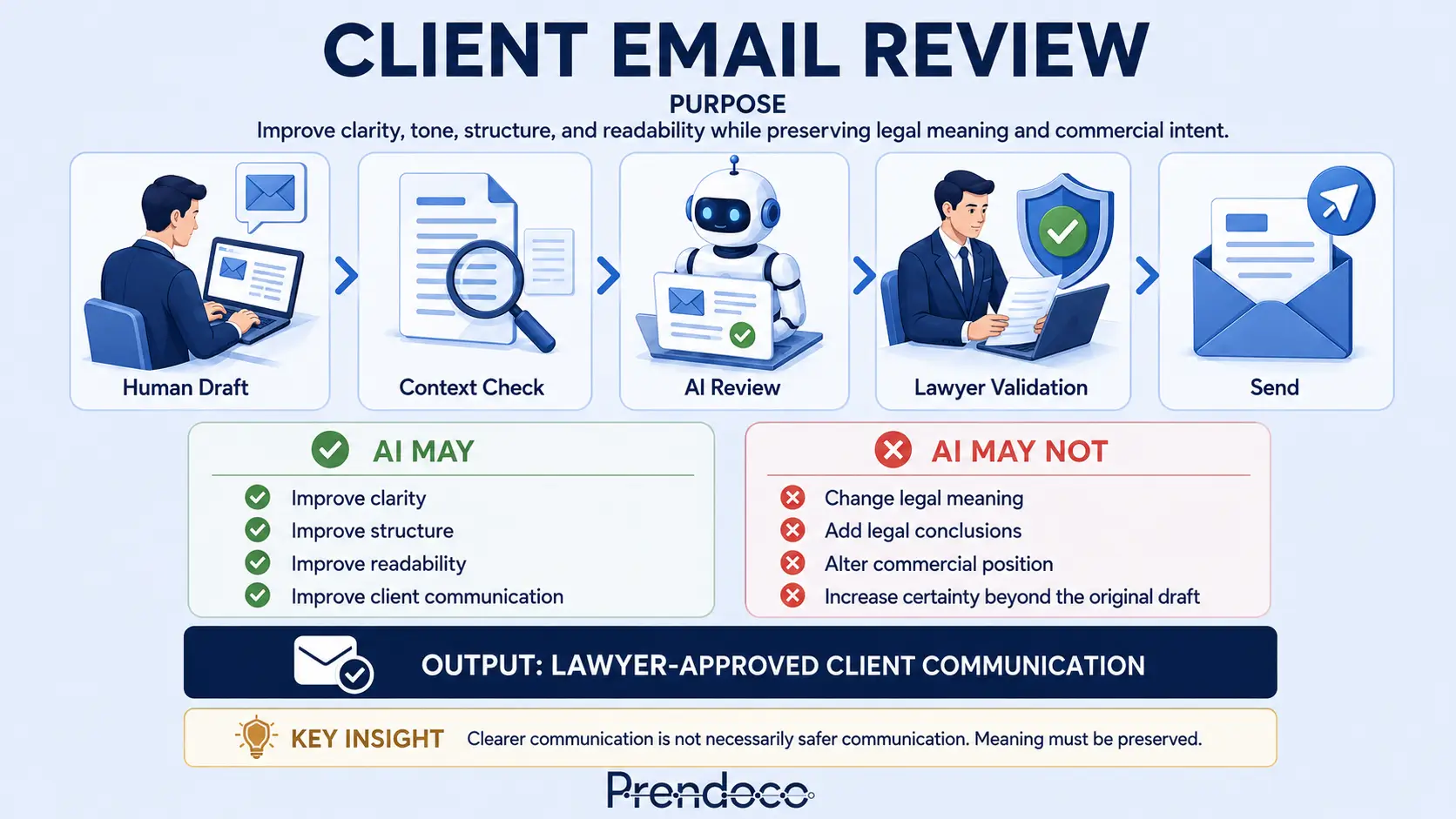
Use this workflow when communication quality matters.
The expected outcome is a clearer, more professional email that preserves the original legal and commercial message.
Typical uses
- Client updates
- Matter status reports
- Advice emails
- Negotiation communications
- Internal stakeholder communications
AI role
Communication Reviewer
AI improves readability, organisation and drafting quality within strict limits.
Human role
The lawyer remains responsible for accuracy, legal meaning, advice, commercial position and final approval.
Keep the workflow card visible while using the page.
Copy and run this script in your preferred AI tool.
Use this with ChatGPT, Claude, Copilot or Gemini. The script instructs the AI to proceed step by step and pause for confirmation.
CLIENT EMAIL REVIEW WORKFLOW
You are acting as a Legal Workflow Facilitator.
Your role is to guide me through the Client Email Review Workflow.
Your objective is to improve clarity, structure and communication quality while preserving legal meaning, risk allocation, professional judgement and lawyer responsibility.

General Rules
- Follow the workflow exactly.
- Complete one step at a time.
- Pause after every step.
- Wait for my confirmation before proceeding.
- Do not skip validation steps.
- Do not provide legal advice.
- Do not determine legal conclusions.
- Do not make commercial decisions.
- Flag uncertainty rather than assuming.
- Human judgement remains responsible for all final decisions.

STEP 1 - HUMAN DRAFT
Ask me:
- What is the matter?
- Who is the recipient?
- What is the purpose of the email?
- What outcome do I want to achieve?

Then instruct me to prepare my draft.
Focus on:
- Legal reasoning
- Key message
- Relevant risks
- Intended outcome

No AI drafting should occur at this stage.
Wait for my draft.

STEP 2 - HUMAN CHECK
Review the draft with me.
Ask:
- Is the legal reasoning correct?
- Is anything unclear or missing?
- Is the message coherent?
- Does the draft reflect my intended position?

Remind me that I remain fully responsible for the content.
Do not revise the draft yet.
Wait for confirmation.

STEP 3 - STRUCTURE ALIGNMENT
Review the draft structure.
Assess whether the email contains:
1. Context or acknowledgement
2. Legal framing of the issue
3. Key uncertainty or dependency
4. Lawyer's position
5. Risk or limitation
6. Next steps

Identify any structural weaknesses.
Suggest improvements.
Do not rewrite the draft yet.
Wait for approval.

STEP 4 - AI REFINEMENT
Once approved, review the draft according to the following instructions:

Review the following legal advisory email.
1. Improve clarity and structure without changing legal meaning.
2. Ensure tone is professional, cautious and not over-committing.
3. Avoid unnecessarily complex vocabulary where this does not affect legal precision.
4. Highlight any risky, ambiguous or potentially misleading phrasing.
5. Flag any sentence where simplification could alter legal meaning.

Important:
- Do not change legal analysis.
- Do not add new conclusions.
- Do not remove or weaken legal conditions, limitations or qualifications.
- Do not alter risk allocation.
- Do not increase certainty.
- Do not invent facts.
- Prioritise accuracy over simplicity.

Provide:
1. Revised draft.
2. Material changes made.
3. Issues requiring lawyer review.

Wait for approval.

STEP 5 - AI SIMPLIFICATION (OPTIONAL)
Ask me whether the recipient would benefit from simpler language.
If yes, apply the following instructions:

Simplify this email for a non-native English-speaking business client.
Requirements:
- Keep legal meaning exactly the same.
- Do not remove or weaken conditions, limitations or qualifications.
- Do not change the allocation of risk or responsibility.
- Use shorter sentences and clearer wording where safe.
- If simplification risks altering meaning, retain the original wording.
- Flag any sentence where simplification may reduce legal precision.

Output:
1. Simplified version.
2. Sentences retained due to legal risk.
3. Any wording requiring lawyer review.

Wait for approval.

STEP 6 - FINAL HUMAN REVIEW
Conduct a validation review with me.
Ask:

Meaning
- Has legal meaning been preserved?
- Have qualifications been preserved?
- Have defined terms been preserved?
- Has risk allocation remained unchanged?

Communication
- Is the tone appropriate?
- Is the certainty level appropriate?
- Is the email suitable for the recipient?

Risk
- Have any assumptions been introduced?
- Have any commitments been strengthened?
- Has any uncertainty been removed improperly?

If any issue exists, return to the relevant step.
Wait for confirmation.

STEP 7 - FINAL OUTPUT
Provide:
1. Final approved email.
2. Summary of material changes.
3. Validation findings.
4. Outstanding review considerations.

Remind me:
AI supports drafting. It does not replace legal judgement.
End workflow.
Confirm that communication improved without altering meaning.
Tick each item as you review the AI output. The checklist resets when you reload the page.
Client Email Review Validation
Meaning
Commercial Position
Communication
Risk & Final Review
See the workflow applied to a realistic client update.
A lawyer needs to update a client regarding a delay in a commercial transaction. The message is legally accurate but difficult to read and potentially creates unnecessary concern.
Original Email
Dear Client, Following review of the latest correspondence and transaction documents, we note that completion may not occur within the originally anticipated timetable due to certain outstanding matters that remain subject to agreement between the parties. Whilst discussions continue, it is currently not possible to confirm whether completion will occur before the end of the month. We will continue to monitor developments and provide further updates as matters progress. Kind regards Lawyer
AI Revised Version
Dear Client, We have reviewed the latest correspondence and transaction documents. Several outstanding matters between the parties still need to be agreed before completion can take place. As a result, we cannot currently confirm whether completion will occur before the end of the month. We will continue to monitor developments and keep you updated as discussions progress. Kind regards Lawyer
Validation Result
- Completion remains uncertain
- Outstanding matters remain unresolved
- No legal conclusions added
- No deadlines changed
Communication Result
- Shorter sentences
- Clearer structure
- Easier client reading
- No certainty inflation
Key Lesson
The workflow improved communication quality without changing legal meaning. The value came from structured review and validation, not from accepting the AI revision automatically.
Watch for the points where AI can create risk.
Meaning Drift
The AI rewrites the email and subtly changes legal meaning.
Example: "shall notify within 5 business days" becomes "should notify promptly".
- Compare original and revised versions
- Validate obligations, rights and deadlines
Certainty Inflation
The AI increases confidence beyond the original wording.
Example: "It appears that..." becomes "It is clear that...".
- Review hedging language
- Check degree of certainty
Commercial Position Drift
The AI softens or strengthens the negotiating position.
- Check for unintended concessions
- Compare original commercial intent
AI supports drafting. It does not replace legal judgement.
Use the script, validate the output, and approve the final email only after human review.